
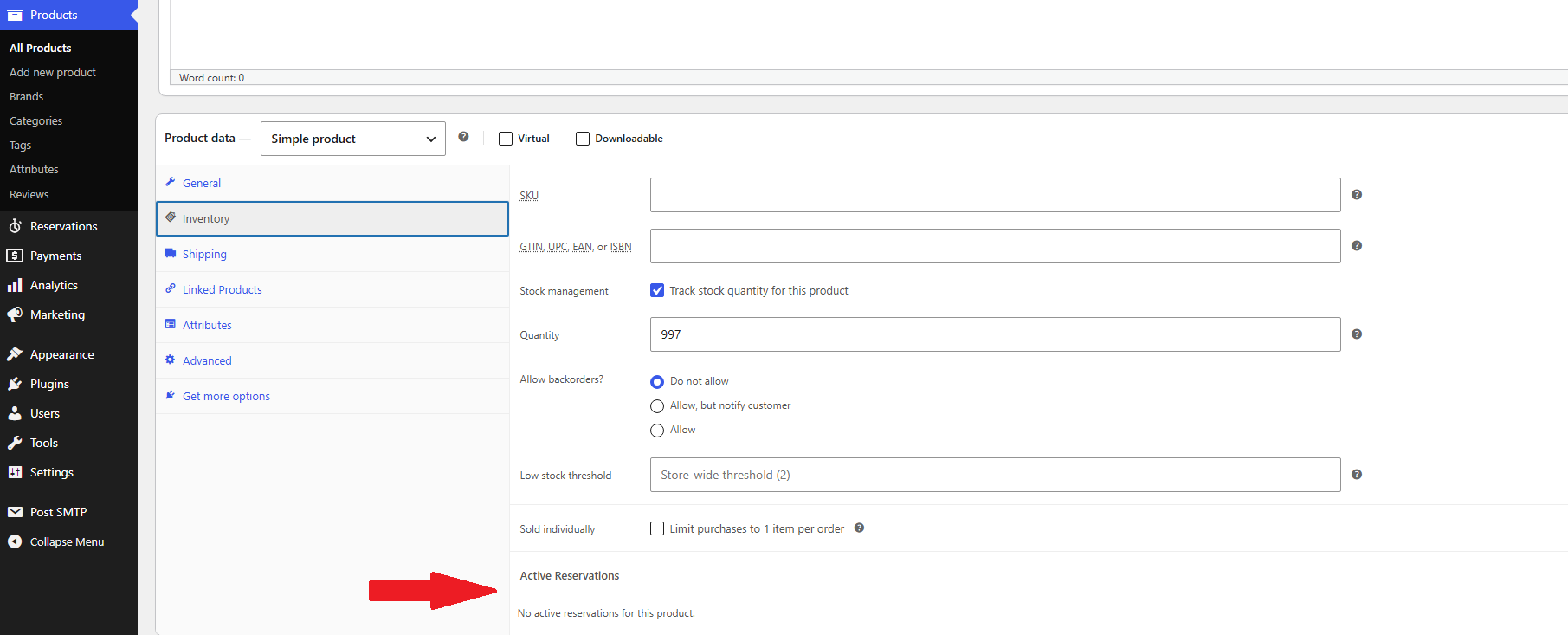
The Product-Level Active Reservations integration adds reservation information directly to the WooCommerce product editing screen.
It allows store administrators to quickly check whether a specific product currently has any active reservations without leaving the product editor.
Where to Find It
To access this section:
WordPress Dashboard → Products → Edit a product → Product data → Inventory
The Active Reservations section appears near the bottom of the WooCommerce Inventory tab.
Active Reservations Section
This section lists current, unexpired active reservations for this product. Pending approval requests are not active stock holds and do not appear in this active list. Use Reservations → Reservations (Manage Reservations page) to review pending requests and reservation history.
When the product has active reservations, the section can be used to review reservation information directly from the WooCommerce product screen.
When there are no active reservations, the following message is displayed:
No active reservations for this product.
How It Helps
The Product-Level Active Reservations integration makes it easier to:
- Check whether a product is currently reserved.
- Review reservation activity while managing product inventory.
- Avoid switching between the product editor and the main Manage Reservations page.
- Better understand why part of a product’s stock may currently be unavailable.
- Monitor reservation activity for individual products.
Stock Management
SpectralDot works alongside WooCommerce stock management.
When a reservation affects the available stock of a product, the Active Reservations section provides additional context directly inside the product’s inventory settings.
The section includes a Cancel action for an active reservation. Cancelling closes the hold and releases its held stock through the reservation workflow. Confirm the customer and hold before using it. Use the main Manage Reservations page for the broader reservation list, filtering and approval workflow.
