
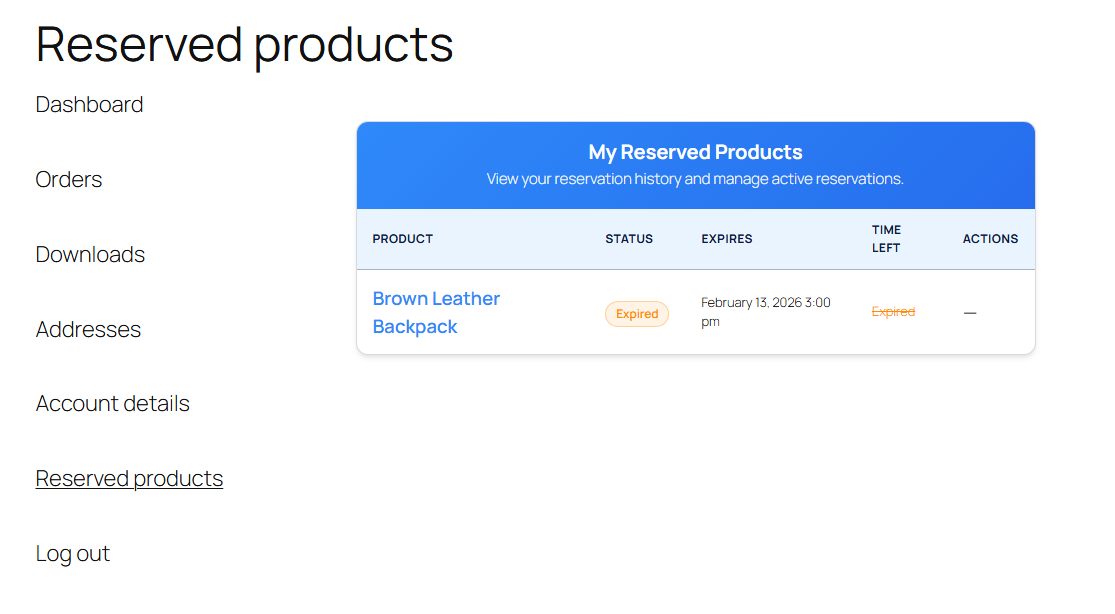
SpectralDot adds a dedicated Reserved products section to the WooCommerce My Account area.
This page allows logged-in customers to review their reservation history, check the status of current reservations, see when reservations expire, and access any actions available for them.
Where Customers Can Find It
Customers can access the page by navigating to:
My Account → Reserved products
The Reserved products link appears alongside the standard WooCommerce account sections, such as Orders, Downloads, Addresses, and Account details.
The exact appearance of the menu depends on the active WordPress theme.
My Reserved Products Table
The page displays the customer’s reservations in the My Reserved Products table.
Each reservation includes the following information.
Product
Displays the name of the reserved product.
The product name is linked, allowing the customer to return to the corresponding product page.
Status
Displays the current reservation status.
Possible statuses may include:
- Pending Approval
- Active
- Expired
- Cancelled
- Purchased (internal status: fulfilled)
- Order cancelled
- Denied
In the displayed example, the reservation has an Expired status.
Purchased reflects hold transfer to an order; payment status is checked in the WooCommerce order.
Expires
Shows the date and time when the reservation is scheduled to expire or when it expired.
For Pending approval, this is the request deadline. For an active hold, it is the active deadline; successful approval starts that deadline from the approval time.
Time Left
Displays the remaining time before an active reservation expires.
For expired reservations, this column indicates that the reservation has already expired.
Actions
On an active reservation, choose Add to Cart, check the cart and complete WooCommerce checkout before the active deadline. Stay signed in with the same account. Active and pending reservations offer Cancel. Cancelling a pending request closes it without releasing stock because none was held; cancelling an active reservation releases its held unit. Closed reservations do not offer these open-reservation actions.
Reservation History
The page includes both current and previous reservation records, allowing customers to review their reservation history from a single location.
This can help customers confirm:
- Which products they reserved.
- Whether a reservation is still active.
- Whether administrator approval is pending.
- When the reservation expires.
- Whether the reservation was cancelled, denied, fulfilled, or expired.
Customer account required
Current Spectral Dot Free reservations require a logged-in customer. Guests cannot create a Free reservation. This account page shows reservations associated with the signed-in customer; do not rely on a guest-to-account linking workflow in Free.
Theme Compatibility
The page uses the WooCommerce My Account layout and adapts to the styling provided by the active theme.
The position, typography, spacing, and menu appearance may vary between themes, but the reservation information and functionality remain the same.
